
Modern web applications rely on APIs to exchange data between websites, mobile applications, third-party services, and backend systems. Whether you are building an eCommerce platform, a SaaS product, or a business management application, a well-designed API helps different systems communicate efficiently and securely.
Laravel is a popular PHP framework for developing robust web applications and RESTful APIs. It provides tools for request handling, authentication, validation, automated testing, and API resource formatting, helping development teams build maintainable backend systems.
However, creating a reliable API involves more than writing endpoints. Developers must implement secure authentication, validate requests, test expected behavior, and maintain clear documentation.
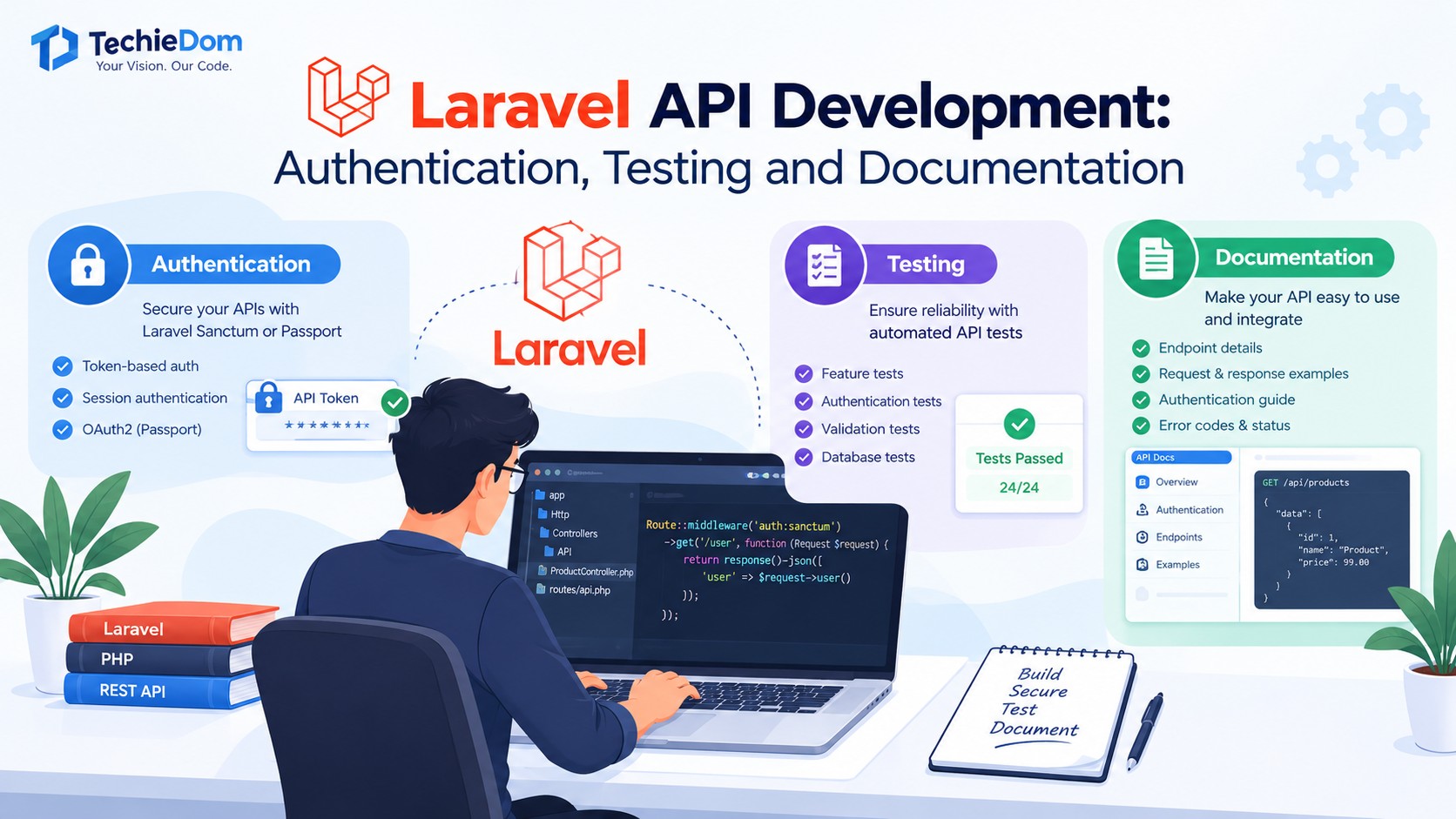
In this guide, we explore the essential aspects of Laravel API development, including authentication methods, testing strategies, and documentation best practices.
Laravel API development involves building application programming interfaces (APIs) using the Laravel PHP framework. An API allows different software applications to exchange information through defined endpoints, typically using HTTP requests and JSON responses.
For example, an eCommerce mobile application may use a Laravel API to retrieve product information, authenticate customers, process orders, and display order histories.
Laravel provides built-in capabilities and ecosystem packages that simplify API development, including routing, middleware, request validation, API resources, authentication tools, and testing utilities.
Laravel APIs can support a wide range of business applications, including:
A structured API architecture helps developers maintain consistent behavior as applications grow and new integrations are introduced.
The first step is to establish a Laravel application with a clear API structure.
Laravel provides API routing support through routes/api.php. Depending on the Laravel version and application setup, API routing may need to be enabled during project installation or configuration.
For example, an API endpoint can return a list of products:
use Illuminate\Support\Facades\Route;
use App\Http\Controllers\Api\ProductController;

Route::get('/products', [ProductController::class, 'index']);
The controller handles the request and returns the appropriate response:
namespace App\Http\Controllers\Api;

use App\Http\Controllers\Controller;
use App\Models\Product;

class ProductController extends Controller
{
    public function index()
    {
        return response()->json([
            'data' => Product::query()->get()
        ]);
    }
}
This is a basic example. Production APIs should also consider pagination, authorization, validation, error handling, and API resource classes to keep responses consistent.
/products and /orders.A well-organized structure makes APIs easier to maintain, test, and extend.
Authentication verifies the identity of a user or application making an API request. It is essential when APIs expose private customer information, account details, or business operations.
Laravel supports different authentication approaches depending on the application’s requirements.
Laravel Sanctum is a practical choice for many first-party applications, including SPAs, mobile applications, and APIs that use personal access tokens.
It supports session-based authentication for first-party SPAs and token-based authentication for API clients.
Typical use cases include:
For example, a protected route can use authentication middleware:
use Illuminate\Http\Request;
use Illuminate\Support\Facades\Route;

Route::middleware('auth:sanctum')->get(
    '/user',
    function (Request $request) {
        return $request->user();
    }
);
The route is accessible only when the request is authenticated through a supported Sanctum authentication mechanism.
For first-party SPAs, developers should configure stateful authentication, cookies, CSRF protection, and trusted domains correctly. Token-based authentication requires appropriate token management and HTTPS.
Laravel Passport provides OAuth2 server functionality and is useful when an application needs standardized authorization flows for third-party clients.
It may be appropriate for applications that require OAuth2 capabilities, such as delegated access or integrations involving multiple external applications.
However, Passport introduces additional configuration and complexity. For simpler first-party authentication needs, Sanctum may be sufficient.
The appropriate solution depends on the application architecture and security requirements.
| Requirement | Possible Approach |
|---|---|
| First-party SPA authentication | Laravel Sanctum with stateful sessions |
| Mobile application API tokens | Laravel Sanctum |
| Simple token-protected API | Laravel Sanctum |
| OAuth2 authorization flows | Laravel Passport |
| Public API access | Carefully designed public endpoints with rate limiting where appropriate |
Authentication alone does not guarantee security. Developers must also implement authorization, validate input, protect sensitive data, and apply rate limits where needed.
After authenticating a request, Laravel applications should determine whether the user has permission to perform the requested action.
Policies and gates can help control access to resources. For example, a user should generally be allowed to update only records they are authorized to manage.
Additional security practices include:
Security should be incorporated throughout API development rather than added after implementation.
API testing helps verify that endpoints behave as expected under different conditions. It can identify issues involving validation, authentication, permissions, response formats, and database operations before an API reaches production.
Laravel provides testing utilities that work with PHPUnit and Pest, allowing developers to write automated tests for application behavior.
Feature tests verify how different application components work together when handling HTTP requests.
For example, a test can check whether a product endpoint returns a successful response:
namespace Tests\Feature;

use Tests\TestCase;

class ProductApiTest extends TestCase
{
    public function test_products_endpoint_returns_successful_response(): void
    {
        $response = $this->getJson('/api/products');

        $response->assertOk()
            ->assertJsonStructure([
                'data'
            ]);
    }
}
This example assumes the products endpoint is publicly accessible and returns a JSON response containing a data key.
Tests can also verify the expected status code, response fields, validation errors, and database changes.
Protected endpoints should be tested with both authenticated and unauthenticated requests.
For example:
public function test_unauthenticated_users_cannot_access_profile(): void
{
    $response = $this->getJson('/api/user');

    $response->assertUnauthorized();
}
This test checks that an unauthenticated request is rejected. The expected status code should match the authentication configuration used by the application.
Developers should also test requests made by authenticated users who lack the required permissions.
Input validation prevents invalid or incomplete data from being processed.
For example, a product creation endpoint might require a product name and a non-negative price.
Tests should cover scenarios such as:
Laravel’s JSON testing methods can verify that invalid requests return the expected validation errors.
Laravel provides database testing utilities, including RefreshDatabase, which helps isolate test cases and maintain predictable database state.
Example:
use Illuminate\Foundation\Testing\RefreshDatabase;
use Tests\TestCase;

class ProductDatabaseTest extends TestCase
{
    use RefreshDatabase;

    public function test_product_can_be_created(): void
    {
        $product = \App\Models\Product::factory()->create();

        $this->assertDatabaseHas('products', [
            'id' => $product->id,
        ]);
    }
}
This example assumes a product model, database table, and model factory are configured.
A practical API testing strategy should include:
Automated testing makes it easier to detect regressions when developers modify existing endpoints or introduce new features.
API documentation explains how developers can interact with an API. It describes available endpoints, authentication requirements, request parameters, response formats, and possible errors.
Without clear documentation, integration teams may struggle to understand how to use an API correctly, increasing implementation time and support requests.
Effective Laravel API documentation should cover:
Documentation should reflect the actual implementation and be updated whenever endpoint behavior changes.
OpenAPI is a widely used specification for describing HTTP APIs. Swagger tools can display this specification in an interactive interface, helping developers understand and explore endpoints.
For Laravel projects, OpenAPI documentation can be generated or maintained using compatible third-party packages and development tools.
An OpenAPI specification typically defines the following:
For larger projects, keeping documentation aligned with the codebase helps reduce discrepancies between documented behavior and actual API responses.
Consider an endpoint that retrieves a customer’s orders.
Endpoint: GET /api/orders
Authentication: Required
Successful response: 200 OK
{
  "data": [
    {
      "id": 101,
      "status": "processing",
      "total": 149.99
    }
  ]
}
This example illustrates a possible response format. Actual fields, data types, and pagination behavior should match the application’s implementation.
Documenting these details gives frontend developers and external integration teams a clear starting point.
Consistent error handling is another important part of professional Laravel API development.
An API should return predictable responses so clients can distinguish between successful operations, validation problems, authentication failures, and server errors.
Common HTTP status codes include:
| Status Code | Meaning |
|---|---|
200 OK | Request completed successfully |
201 Created | A resource was created |
400 Bad Request | Request cannot be processed due to a client-side problem |
401 Unauthorized | Authentication is required or invalid |
403 Forbidden | The authenticated user lacks permission |
404 Not Found | The requested resource does not exist |
422 Unprocessable Content | Request validation failed |
429 Too Many Requests | The client exceeded a rate limit |
500 Internal Server Error | An unexpected server-side error occurred |
Developers should avoid returning sensitive debugging information in production responses. Detailed exception traces belong in protected server logs, not in public API output.
A consistent error format also makes it easier for frontend applications to display helpful messages and handle failures gracefully.
As applications evolve, API requirements may change. New features may introduce additional fields, modify response structures, or change how requests are processed.
API versioning helps manage changes that could affect existing clients.
For example, an application might use routes such as:
/api/v1/products/api/v2/productsA new version can introduce breaking changes while allowing existing integrations to continue using the previous version during a planned transition.
Not every change requires a new version. Adding optional fields may be backward-compatible, depending on how clients consume the response.
A good maintenance strategy should include change management, automated regression tests, documentation updates, dependency upgrades, and a clear process for deprecating older endpoints.
A reliable API requires attention to performance, maintainability, and security throughout the development lifecycle.
Consider these best practices:
These practices help development teams build APIs that remain easier to operate and extend as business requirements change.
Building a production-ready API requires expertise in backend architecture, authentication, database design, testing, integration, and documentation.
A professional Laravel development company can help businesses plan their API architecture, implement secure access controls, connect third-party applications, and establish automated testing and documentation workflows.
The development process should begin with clear requirements and include architecture planning, endpoint design, implementation, quality assurance, deployment, and ongoing maintenance.
At TechieDom, businesses can explore software development services designed around their application requirements and digital growth goals. Whether you are creating a new product, connecting existing systems, or modernizing a backend application, the right development approach can improve maintainability and support future expansion.
Laravel API development involves more than creating endpoints that return JSON. A dependable API requires secure authentication, clear authorization rules, comprehensive testing, consistent error handling, and accurate documentation.
Laravel Sanctum and Passport support different authentication requirements, while Laravel’s testing utilities help developers verify application behavior. OpenAPI-compatible documentation tools can make integrations easier to understand and maintain.
By following established development practices, businesses can build APIs that are secure, reliable, and easier to scale.
Planning a Laravel API for your business? Connect with TechieDom to explore software development solutions tailored to your technical requirements and long-term objectives.
Laravel API development is the process of building interfaces with the Laravel PHP framework so websites, mobile apps, and external systems can communicate with backend services.
Laravel Sanctum is suitable for many first-party SPAs and token-based API clients. Laravel Passport is worth considering when OAuth2 authorization capabilities are required. The best choice depends on the application’s architecture and security needs.
Developers can use Laravel’s HTTP testing methods with PHPUnit or Pest to test successful responses, validation, authentication, authorization, database operations, and error handling.
Documentation can be maintained manually or generated using tools compatible with OpenAPI. It should describe endpoints, authentication, parameters, response schemas, status codes, and error conditions.
Yes. Laravel can support large applications when designed with appropriate architecture, database optimization, caching, queue processing, security controls, and monitoring. Actual scalability depends on implementation and infrastructure.
Authentication verifies who is making a request. Authorization determines what that user is allowed to access or do. Both are essential for protecting API resources.
Clear documentation helps frontend developers, integration partners, and other teams understand how to use an API correctly. It reduces ambiguity, simplifies integration, and supports ongoing maintenance.