

A successful digital product needs more than an attractive interface. It should be easy to navigate, solve real user problems, and support business goals. Whether you are building a business website, a mobile application, or a custom software platform, the quality of its user interface (UI) and user experience (UX) can directly influence how people interact with your product.
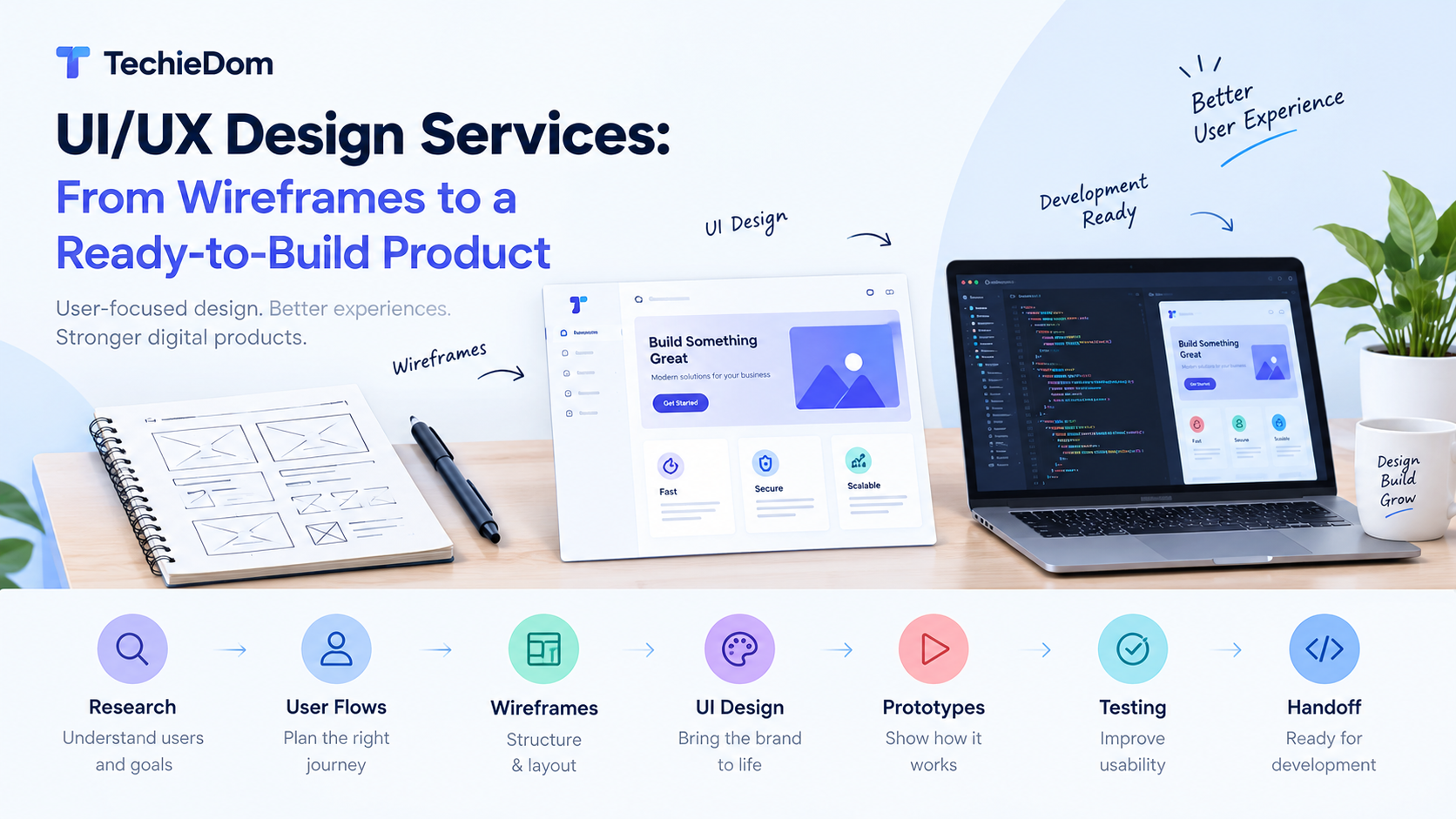
Professional UI/UX design services help businesses transform ideas into practical, user-friendly digital experiences. From researching user needs and creating wireframes to designing interactive prototypes and preparing development-ready files, the process ensures that every screen has a clear purpose before development begins.
In this guide, we explore how the UI/UX design process works, what each stage involves, and how businesses can turn an initial concept into a product ready for development.
UI/UX design services focus on improving how a digital product looks, feels, and functions.
User Experience (UX) design focuses on the overall journey. It considers how users find information, complete tasks, navigate between screens, and achieve their goals with minimal friction.
User Interface (UI) design focuses on the visual and interactive elements, including layouts, typography, colors, buttons, icons, forms, and other components users interact with.
Although UI and UX have different responsibilities, they work together to create a consistent digital experience.
For example, an e-commerce website may have an attractive homepage, but if customers struggle to find products or complete checkout, the experience is incomplete. UX design improves the shopping journey, while UI design makes each step clear, consistent, and visually engaging.
Investing in UI/UX design before development can help businesses reduce uncertainty, improve usability, and establish a clear product direction.
Here are some important benefits.
Users expect digital products to be easy to understand and navigate. A well-planned interface helps them find information, complete actions, and move through the product without unnecessary confusion.
Building an application without a clear design plan can lead to repeated changes during development. Wireframes and prototypes allow teams to identify usability issues and validate ideas before investing significant development time.
A well-designed user journey can make important actions easier, whether that means submitting a contact form, requesting a quote, booking a service, or completing a purchase.
Professional UI design establishes consistent colors, typography, spacing, buttons, and visual elements across screens. This helps create a recognizable and cohesive brand experience.
Designers consider different screen sizes, readable text, contrast, touch targets, and accessible interaction patterns. These considerations help make digital products more usable for a wider audience.
A structured design process helps turn business requirements into a product that developers can build with confidence. While the exact workflow varies by project, most UI/UX design projects include the following stages.
Every successful design project begins with understanding the problem the product needs to solve.
During the discovery stage, the design team works with stakeholders to understand business objectives, target users, product requirements, competitors, and technical constraints.
Typical activities include:
For example, a business developing a customer portal may want users to manage accounts, view invoices, and submit support requests. The discovery stage helps prioritize these requirements and identify the main user journeys.
Deliverable: A clear project brief, documented requirements, and an agreed design direction.
User research helps designers understand how people behave, what they expect, and where they may experience difficulties.
Depending on the project, research may include user interviews, surveys, usability testing, analytics reviews, and competitor analysis. Not every project requires every research method; the approach should reflect the available data, timeline, and product complexity.
Designers can then create user personas, map customer journeys, and identify opportunities to improve the experience.
For example, if users frequently abandon a registration process, research may reveal that the form requests too much information upfront. The design team can explore a shorter registration flow or a step-by-step form.
Deliverable: User insights, journey maps, and prioritized usability requirements.
Before designing individual screens, designers organize the product’s content and define how users move between different sections.
Information architecture establishes the structure of pages, features, menus, and categories. User flows show the steps required to complete specific tasks.
For an online booking platform, a typical user flow might include:
Mapping this journey helps teams identify unnecessary steps, missing screens, and confusing navigation before visual design begins.
Deliverable: Site maps, navigation structures, and user-flow diagrams.
Wireframing is one of the most important stages of the UI/UX design process. A wireframe is a simplified representation of a webpage or application screen that focuses on structure and functionality rather than final visual styling.
Wireframes typically define:
Wireframes can be low-fidelity sketches or more detailed digital layouts. The appropriate level depends on the project’s complexity and how much validation is needed.
For instance, a wireframe for a service landing page may show the headline, supporting content, service benefits, testimonials, and contact form before the team decides on colors, fonts, and imagery.
This makes it easier for stakeholders to review the layout and request changes early.
Deliverable: Wireframes for the required website pages or application screens.
Once the wireframes are approved, designers develop the visual identity of the product.
This stage transforms basic layouts into polished interfaces that reflect the brand and provide a consistent experience across screens.
The design team works on:
A design system or component library can also be established to maintain consistency across a larger website or application.
For example, a SaaS dashboard may use consistent buttons, tables, navigation elements, status indicators, and form fields throughout the product. This improves visual consistency and makes future updates easier to manage.
Deliverable: High-fidelity UI designs and reusable design components.
A prototype demonstrates how the product is expected to behave when users interact with it.
Unlike static mockups, interactive prototypes can simulate navigation, button actions, dropdowns, form steps, and other important interactions. They allow stakeholders to experience the proposed interface before development begins.
Prototypes are particularly useful for:
For example, an interactive prototype of a food delivery application could simulate browsing restaurants, adding items to a cart, and moving through checkout.
Deliverable: An interactive prototype for review and usability testing.
A design that looks good in a presentation may still be difficult to use. Usability testing helps identify these issues before they become development problems.
Designers may ask representative users to complete specific tasks while observing where they hesitate, make mistakes, or become confused.
The team can then refine the design based on findings and stakeholder feedback.
Common improvements include simplifying navigation, clarifying button labels, reducing form complexity, improving contrast, and making important actions easier to identify.
Testing should focus on real user tasks rather than personal design preferences alone.
Deliverable: A refined design with documented usability findings and resolved high-priority issues.
The final stage of UI/UX design is preparing the approved designs for implementation.
A development-ready handoff gives developers the information they need to reproduce the intended interface and behavior as accurately as practical.
A complete handoff may include:
Design tools such as Figma can help teams organize screens, inspect design properties, share components, and collaborate during handoff.
Developers can then use these specifications to implement the interface using the appropriate technology stack.
Deliverable: Organized design files, assets, specifications, and implementation notes.
The scope of UI/UX design services depends on the product, business requirements, and available budget. However, a comprehensive engagement may include the following.
| Service | What It Covers |
|---|---|
| UX research | User needs, competitor analysis, and product discovery |
| Information architecture | Site maps, navigation, and content organization |
| User-flow design | Task journeys and interaction sequences |
| Wireframing | Screen structure and layout planning |
| UI design | Colors, typography, visual elements, and layouts |
| Prototyping | Simulated interactions and user journeys |
| Usability testing | Identifying and resolving user experience issues |
| Responsive design | Layouts for desktop, tablet, and mobile |
| Design systems | Reusable components and visual standards |
| Developer handoff | Design specifications, assets, and interaction notes |
Before selecting a design partner, clarify which deliverables are included, how many revision rounds are available, whether usability testing is covered, and how the final files will be handed over.
Different digital products require different design approaches.
Website design focuses on clear navigation, readable content, responsive layouts, and conversion-oriented user journeys. Businesses may need service pages, product pages, landing pages, contact forms, and other essential sections.
Mobile applications require special attention to smaller screens, touch interactions, onboarding, permissions, and platform-specific design patterns. The goal is to make common tasks simple and intuitive.
SaaS platforms and business dashboards often contain complex workflows, data tables, filters, reports, and account settings. Good UX helps users understand information quickly and complete tasks efficiently.
E-commerce design focuses on product discovery, category navigation, product details, cart management, and checkout. A smooth shopping experience can help remove friction from the purchasing journey.
Custom software often supports specialized business processes. Designers work with stakeholders to understand those workflows and build interfaces that simplify tasks without sacrificing necessary functionality.
Even a visually attractive product can struggle if its design does not address users’ needs. Watch out for these common mistakes.
Designing without understanding users: Making assumptions about user behavior can lead to confusing workflows. Use appropriate research and validation to guide design decisions.
Skipping wireframes: Moving directly to polished screens can make structural problems more expensive to correct later.
Ignoring mobile responsiveness: A layout that works on desktop may become difficult to navigate on smaller screens. Plan responsive behavior from the beginning.
Overloading screens with information: Too many elements compete for attention. Use clear hierarchy, appropriate spacing, and progressive disclosure where suitable.
Treating accessibility as an afterthought: Readability, contrast, keyboard navigation, focus states, and understandable labels should be considered throughout the design process.
Handing off incomplete designs: Missing states, unclear specifications, and undocumented interactions can create unnecessary questions during development.
Failing to validate the design: Stakeholder approval alone does not guarantee usability. Test important user journeys wherever practical.
Choosing a design partner is an important decision because the quality of the design process affects both the user experience and the development workflow.
Consider these factors before making a decision:
A reliable design partner should be able to explain not only how a product will look, but also how its design supports users and business goals.
UI/UX design and software development are closely connected, but they serve different purposes.
Design defines the structure, appearance, and expected behavior of the product. Development implements those designs using code, integrations, databases, and the required technology stack.
When both teams collaborate early, they can identify technical limitations, validate interactions, estimate implementation effort, and reduce misunderstandings during development.
For example, a designer may create a sophisticated dashboard interaction that depends on real-time data. A developer can help assess its technical feasibility and suggest an alternative that preserves the user experience while meeting performance and project constraints.
This collaboration helps ensure that the final product remains consistent with the approved design while functioning reliably in real-world conditions.
UI/UX design services help businesses transform initial ideas into structured, user-friendly, and development-ready digital products. From discovery and user research to wireframes, visual design, interactive prototypes, testing, and developer handoff, each stage contributes to a clearer product vision.
A well-defined design process can reduce avoidable rework, improve usability, and give development teams a stronger foundation for implementation.
If you are planning to build a website, mobile application, SaaS platform, or custom software solution, investing in UI/UX design before development can help you make informed decisions and create a better experience for your users.
Looking for professional UI/UX design services? TechieDom can help businesses plan and develop digital solutions with a focus on usability, functionality, and business objectives. Explore the available services at TechieDom and discuss your project requirements with the team.
UI/UX design services help businesses plan and design digital products that are visually consistent, easy to navigate, and aligned with user needs. They may include research, wireframing, interface design, prototyping, usability testing, and developer handoff.
Wireframes focus on the structure and layout of screens, while prototypes simulate interactions and demonstrate how users move through a product. Wireframes help establish the layout; prototypes help validate the experience.
The timeline depends on product complexity, the number of screens, research requirements, stakeholder availability, and revision cycles. A small website may need considerably less time than a complex SaaS platform or enterprise application.
It is not mandatory for every project, but it is highly valuable for products with multiple screens, complex workflows, or specific usability requirements. Design helps clarify requirements and identify potential problems before implementation.
A development-ready handoff typically includes approved screen designs, responsive layouts, reusable components, design specifications, assets, interaction details, and relevant documentation. The exact scope varies by project.
Yes. A well-designed user journey can make important actions easier to understand and complete. However, conversion improvements depend on multiple factors, including audience intent, offer quality, traffic, usability, and ongoing testing.